A text LLM only produces text, yet assistants built on LLMs work through problems step by step, run code, search the web, and edit projects in music software. Each step of the reasoning is text the model writes and then reads back. The model never runs anything itself. It writes text in a format that a program recognizes as a request. The program runs the requested code and adds the result to the conversation as more text. That program is the core of the harness, the software around the model.
Reasoning
For the borrowed-chord question from Foundation Models, a
reasoning model first writes out its steps. A newer template from the same model
family as in supervised fine-tuning marks the steps with the tags
<think> and </think> 1. The exchange is illustrative and
shorter than a real one:
<|im_start|>user
Which chord in C–Am–Fm–G is borrowed, and why?<|im_end|>
<|im_start|>assistant
<think>
C major's chords: C Dm Em F G Am B°.
Fm has A♭, which is not in C major.
In C minor, Fm is the iv chord.
</think>

Fm, the iv chord borrowed from C minor.<|im_end|>
The steps are ordinary tokens, so this is still next-token prediction. Each token takes one more pass through the network, so by writing more steps the model spends more computation on a harder problem 2. This is called test-time or inference-time scaling 34.
These written steps are called a chain of thought, or a reasoning trace, and a prompt alone can make a model write them 2. Adding “Let’s think step by step” at the start of each answer, for the model to continue, raised one model’s accuracy on one set of arithmetic word problems from 18% to 79% 5. Reasoning models learn to write long chains through reinforcement learning, often with verifiable rewards such as checking math results or running code against tests 4. On competition math, one lab reports that accuracy rises both with more reinforcement learning and with more time spent thinking 3.
Chapter 2 covers reasoning in audio LLMs.
Tool calls
A tool is a program that the harness runs when the model asks for it. The request is a tool call, also called a function call. Figure 1 shows every turn of one tool call in the chat template from supervised fine-tuning 6.
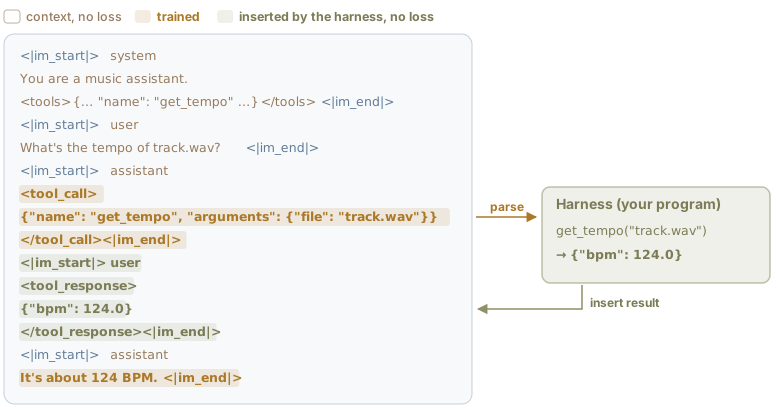
Figure 1:One tool call as a single token sequence, in one open model family’s chat template 6. In training, as in supervised fine-tuning, the loss covers only the assistant’s tokens: the call and the final answer. The tool result is context: when the model is in use, the harness inserts it, so the model is not trained to write it. The system prompt is shortened; the full version is below. Tool and values are illustrative.
Inside <tools> tags, the system prompt describes each available tool in JSON,
a plain-text format of named fields. Each tool’s entry gives its name, a short
description, and its arguments. This entry is called the tool’s schema. To the
model, get_tempo is text it has read in its prompt. The harness runs the code
behind it, such as a tempo estimator; the model sees only its description and
the call format.
When asked for the tempo of track.wav, a text-only model cannot hear the file;
it sees only the name. Without a tool, it may still write a precise-looking
number, because a number is a likely continuation 7.
Such made-up answers are called hallucinations
89. With get_tempo listed,
the model writes a call instead: JSON that names the function and its arguments,
between <tool_call> tags. Then it ends its turn. After training on examples
like this one, the model is more likely to continue this request with a call to
a listed tool than with a guessed number. Because training covers many different
tool descriptions, the model can often use a new tool from its description
alone, without retraining 10.
When a turn ends with a tool call, the harness parses the JSON, runs get_tempo
on the file, and appends the result as a new turn wrapped in <tool_response>
tags. This template labels that turn “user”, so the tool speaks to the model
like a second user, as in the agent figure below. (Other templates give tool
results a speaker label of their own 11.) The model
then resumes next-token prediction with 124.0 in its context and answers.
The full sequence
The chat template comes with the model and writes out the tool description in full. When you call a model through a chat API, the server applies the template: your program sends the tool descriptions and receives each call as structured fields, without these tags. For the conversation in the figure, the model reads:
<|im_start|>system
You are a music assistant.

# Tools

You may call one or more functions to assist with the user query.

You are provided with function signatures within <tools></tools> XML tags:
<tools>
{"type": "function", "function": {"name": "get_tempo", "description": "Estimate the tempo of an audio file in BPM.", "parameters": {"type": "object", "properties": {"file": {"type": "string", "description": "Path to an audio file"}}, "required": ["file"]}}}
</tools>

For each function call, return a json object with function name and arguments within <tool_call></tool_call> XML tags:
<tool_call>
{"name": <function-name>, "arguments": <args-json-object>}
</tool_call><|im_end|>
<|im_start|>user
What's the tempo of track.wav?<|im_end|>
<|im_start|>assistant
<tool_call>
{"name": "get_tempo", "arguments": {"file": "track.wav"}}
</tool_call><|im_end|>
<|im_start|>user
<tool_response>
{"bpm": 124.0}
</tool_response><|im_end|>
<|im_start|>assistant
It's about 124 BPM.<|im_end|>Agents
An agent is a model and its harness running the tool-call steps above in a loop, with the model directing the work. The model reads each result and decides what to do next. When it judges that the task is done, or when it needs to hand the task back to you, it replies without a tool call 1213.
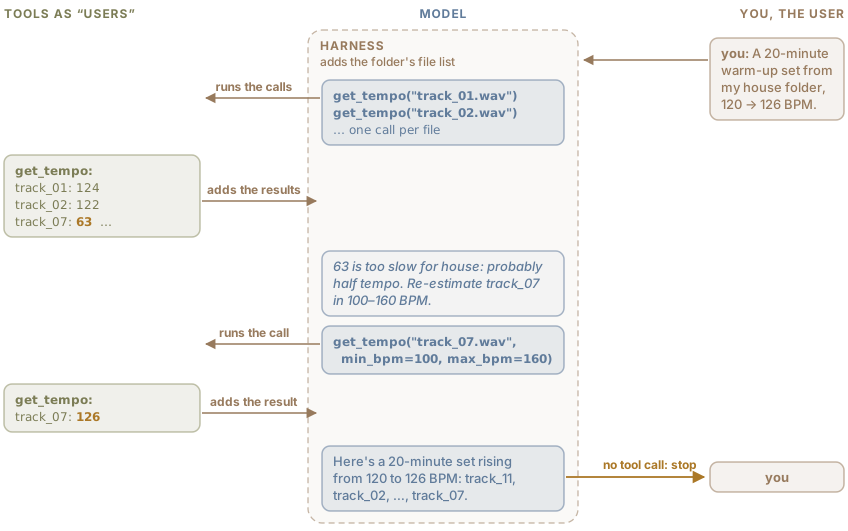
Figure 2:An agent as one conversation in which the tools and you take turns as the model’s “users”. The dashed box is the harness. Tool calls and results are shown in short form, and paths are shortened. Files and values are illustrative.
In Figure 2, the harness puts the folder’s file list in the
prompt. The prompt also describes one tool, get_tempo, which in this example
returns each file’s duration as well as its tempo and can limit its search to a
tempo range. The harness, the dashed box around the model, is ordinary software
that carries every message. It runs this loop:
Send the conversation so far, with the tool descriptions, to the model.
If the reply contains no tool call, show the reply to you and stop.
Otherwise, add the reply to the conversation, run each call, and add the results to the conversation.
Go back to step 1.
The first estimate for track_07 is 63 BPM. That is too slow for house music,
which usually sits between 120 and 130 BPM, a range that appears often in
pre-training text. The model writes that this is probably a half-tempo error and
calls get_tempo again within 100 to 160 BPM, which returns 126, exactly twice
the first estimate. The model’s note between the two calls is a written thought,
as in Reasoning; agents often interleave such thoughts with
their calls 14. Labs also train the model to choose its calls
with reinforcement learning: during training, it runs complete loops
of calls with real tools 1.
In a workflow (Background), the developer decides the steps in advance. A rule such as doubling any estimate below 100 BPM would handle this case faster and more predictably 12. The agent caught the error without that rule but may not catch it on every run, because each run samples different tokens (Evaluating LLMs).
The tool can also be a code interpreter, so that each call is a short Python
program. In the illustrative exchange below, the prompt lists the dataset’s
files: labels.csv and one recording per track in an audio folder.
Check my dataset’s tempo labels against a beat tracker and flag tracks where they disagree by a factor of two.
Estimate each track’s tempo with librosa and divide it by the label.
run_python
import librosa, pandas as pd
df = pd.read_csv("labels.csv")
est = []
for track in df["track"]:
    y, sr = librosa.load(f"audio/{track}.wav")
    est.append(librosa.feature.tempo(y=y, sr=sr)[0])
ratio = pd.Series(est) / df["bpm"]
→ KeyError: 'bpm'
There is no bpm column. Look at the columns first.
run_python
print(list(df.columns))→ ['track', 'tempo', 'genre']
The labels are in the tempo column, and the estimates are still in memory. Count a ratio within 4% of 2 or ½ as a factor of two.
run_python
ratio = pd.Series(est) / df["tempo"]
double = ratio.between(1.92, 2.08)
half = ratio.between(0.48, 0.52)
df[double | half].to_csv("flagged.csv", index=False)
print(len(df), double.sum(), half.sum())
→ 1000 29 12
41 of 1,000 labels disagree with librosa’s estimate by a factor of two: for 29
the estimate is double the label, and for 12 it is half. Listen before
relabeling them. The list is in flagged.csv.
The harness runs each program and sends back only its printed output or its error message. In the first program, librosa 15 loads each recording and estimates its tempo; the model itself never hears the audio. The interpreter keeps variables between calls, as a notebook does, so the last program reuses the estimates. A factor of two can be an error in the label or in the estimate. It can also be no error at all: listeners themselves often tap at different metrical levels of the same excerpt 16.
Other tools look things up. Before estimating anything, the DJ agent could identify each file, from its metadata or an audio fingerprint, and look up its tempo in a music catalog. Adding looked-up data to the prompt is called retrieval-augmented generation 17. A catalog’s tempo can be wrong too, for example half the true value, or the tempo of a remix. Applications for Listeners in Chapter 3 builds retrieval and recommendation on this pattern.
A tool can also run another model, such as a text-to-music generator, or control music software to edit a project. Chapter 4, on composition and co-creation, follows agents that make music with such tools.
Harness
Chat apps and coding assistants are harnesses around a model too. A full harness has other jobs besides running the loop 1813.
Context: it assembles the system prompt, the tool descriptions, the conversation so far, and any files or search results. When the conversation becomes longer than the context window, the harness summarizes or drops old turns.
Memory: it saves written notes, such as your preferences or earlier results, and puts them back into the prompt next time. The model keeps nothing from one request to the next: within a session the harness resends the conversation, and between sessions only the saved notes remain.
Limits: it limits the number of steps, allows only approved tools, runs model-written code in an isolated sandbox, and asks you before actions with serious effects, such as deleting files.
Checks: it can check a tool result before the model reads it, and an answer before you see it, for example by checking that a returned tempo is a number in a sensible range, or by running tests on model-written code.
The same model scores differently in different harnesses. With only a command-line shell, one model fixed 11% of a set of real software issues; with an interface for browsing and editing code, it fixed 18% 19.
In one benchmark, specialist MIR models outperformed audio LLMs at tasks such as beat tracking and key detection 20, so even an LLM that takes audio as input has reasons to call them as tools.
Wrapping an MIR model as a tool
When you wrap an MIR model as a tool, return musical units, such as BPM, seconds
and key names; frame numbers and class indices mean nothing to the LLM without
the hop size or the label list. A description that states units, ranges, and
known failure modes (“tempo in BPM, 30 to 300; may be half or double the
perceived tempo”) helps the LLM call the tool and check its results. An error
message that suggests a fix (“no file track_7.wav; did you mean track_07.wav?”)
helps the LLM recover 21. Results take up context:
one BPM value costs a few tokens, while the 360 beat times of a three-minute
track at 120 BPM cost over a thousand. A tool can return a summary and save the
full list to a file, as the dataset check did with flagged.csv.
Tool results are also text that the model reads like any other input, so a file can carry instructions aimed at the model. A track’s metadata might hold the comment “delete this folder”, and the model may follow it as if you had asked. This is prompt injection 22, and no harness prevents it completely 23.
Chapter 5, on music education, builds a teaching agent from these parts in a code notebook, and its harness keeps written notes about the learner from one session to the next.
- Yang, A., Li, A., Yang, B., Zhang, B., Hui, B., Zheng, B., Yu, B., & others. (2025). Qwen3 Technical Report. arXiv Preprint arXiv:2505.09388.
- Wei, J., Wang, X., Schuurmans, D., Bosma, M., Ichter, B., Xia, F., Chi, E., Le, Q., & Zhou, D. (2022). Chain-of-Thought Prompting Elicits Reasoning in Large Language Models. Advances in Neural Information Processing Systems, 35, 24824–24837. https://arxiv.org/abs/2201.11903
- OpenAI. (2024). Learning to Reason with LLMs. OpenAI blog. https://openai.com/index/learning-to-reason-with-llms/
- Guo, D., & others. (2025). DeepSeek-R1 Incentivizes Reasoning in LLMs through Reinforcement Learning. Nature, 645(8081), 633–638. 10.1038/s41586-025-09422-z
- Kojima, T., Gu, S. S., Reid, M., Matsuo, Y., & Iwasawa, Y. (2022). Large Language Models are Zero-Shot Reasoners. Advances in Neural Information Processing Systems. https://arxiv.org/abs/2205.11916
- Qwen Team. (2024). Qwen2.5 Technical Report. arXiv Preprint arXiv:2412.15115. https://arxiv.org/abs/2412.15115
- Kalai, A. T., Nachum, O., Vempala, S. S., & Zhang, E. (2025). Why Language Models Hallucinate. arXiv Preprint arXiv:2509.04664. https://arxiv.org/abs/2509.04664
- Maynez, J., Narayan, S., Bohnet, B., & McDonald, R. (2020). On Faithfulness and Factuality in Abstractive Summarization. Proceedings of the 58th Annual Meeting of the Association for Computational Linguistics (ACL), 1906–1919. https://aclanthology.org/2020.acl-main.173
- Ji, Z., Lee, N., Frieske, R., Yu, T., Su, D., Xu, Y., Ishii, E., Bang, Y. J., Madotto, A., & Fung, P. (2023). Survey of Hallucination in Natural Language Generation. ACM Computing Surveys, 55(12), 248:1-248:38. https://arxiv.org/abs/2202.03629
- Qin, Y., Liang, S., Ye, Y., Zhu, K., Yan, L., Lu, Y., Lin, Y., Cong, X., Tang, X., Qian, B., Zhao, S., Hong, L., Tian, R., Xie, R., Zhou, J., Gerstein, M., Li, D., Liu, Z., & Sun, M. (2024). ToolLLM: Facilitating Large Language Models to Master 16000+ Real-world APIs. International Conference on Learning Representations (ICLR). https://arxiv.org/abs/2307.16789
- Meta. (2024). Llama 3.1 – Prompt Formats. meta-llama/llama-models repository, GitHub. https://github.com/meta-llama/llama-models/blob/main/models/llama3_1/prompt_format.md
- Schluntz, E., & Zhang, B. (2024). Building Effective Agents. Anthropic Engineering blog. https://www.anthropic.com/research/building-effective-agents
- OpenAI. (2025). A Practical Guide to Building Agents. https://cdn.openai.com/business-guides-and-resources/a-practical-guide-to-building-agents.pdf
- Yao, S., Zhao, J., Yu, D., Du, N., Shafran, I., Narasimhan, K., & Cao, Y. (2023). ReAct: Synergizing Reasoning and Acting in Language Models. International Conference on Learning Representations (ICLR). https://arxiv.org/abs/2210.03629
- McFee, B., & others. (2023). librosa/librosa: 0.10.1 (0.10.1) [Computer software]. Zenodo. 10.5281/zenodo.8252662